

This article explains how to fix the error 501 failed to set sender when sending emails from RoundCube (Webmail).
Symptoms
When trying to send an email from RoundCube, the following appears:
501 failed to set sender
Sending may work correctly from Horde, another webmail, or an email client (Outlook, Thunderbird, etc.).
Cause
The error is usually caused by the fact that you did not create an identity in RoundCube. Without a configured identity, the system cannot define the sender address when sending.
Solution — Create the identity in RoundCube
- Log in to RoundCube from your hosting's Webmail.
- Go to Settings (gear icon).
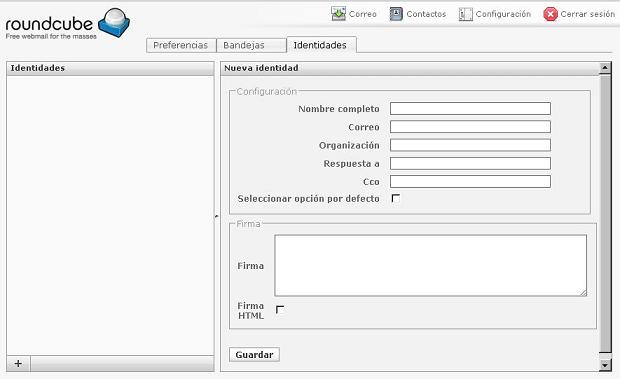
- Select the Identities tab.
- Press the + button to add a new identity.
- Fill in the fields (see table below).
- Press Save.
- Try sending a test email.
| Field | What to fill in |
|---|---|
The exact mailbox you logged into Webmail with (example: contact@yourdomain.com). |
|
| Name | Name that recipients will see (example: Your name). |
Important: The Email field must exactly match the mailbox you logged in with. If it does not match, the error may continue.
Do you need help?
If the error persists after creating the identity, contact technical support from the client portal or the site's online chat.