
This article explains how to change the password of an email account from cPanel. That password is the one used by Webmail and the email client. It is not your client portal password or your cPanel login password.
What is it for?
It is recommended to change it if you forgot it, if someone else knows it, or if you are going to stop using a device where it was saved. When you save it:
- Webmail will ask for the new password.
- Outlook, your phone, and any other program will stop working until you update them.
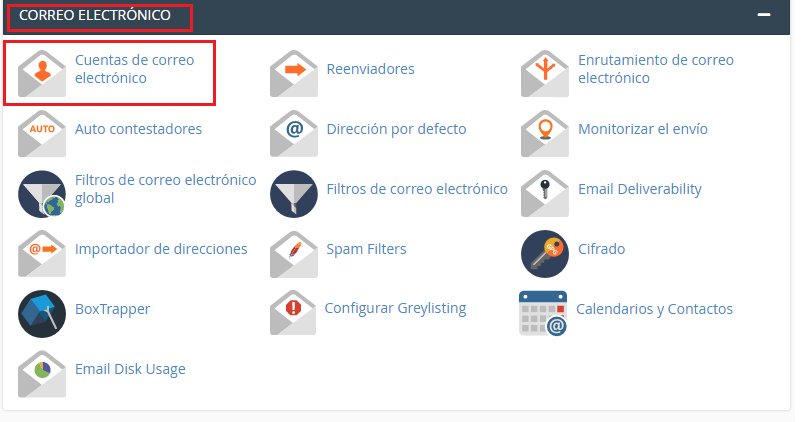
Access: log in to cPanel from the client portal → Log in to cPanel, or at https://yourdomain.com/cpanel. Then go to Email → Email Accounts.
Important: in the portal, Services → Actions → Change Password changes the service password, not the email account password. For the email account, use the steps below. The new password must not include the account name, accents, or ñ. The simplest thing to do is use Generate.
Change the password
- Log in to cPanel.
- Open Email → Email Accounts.
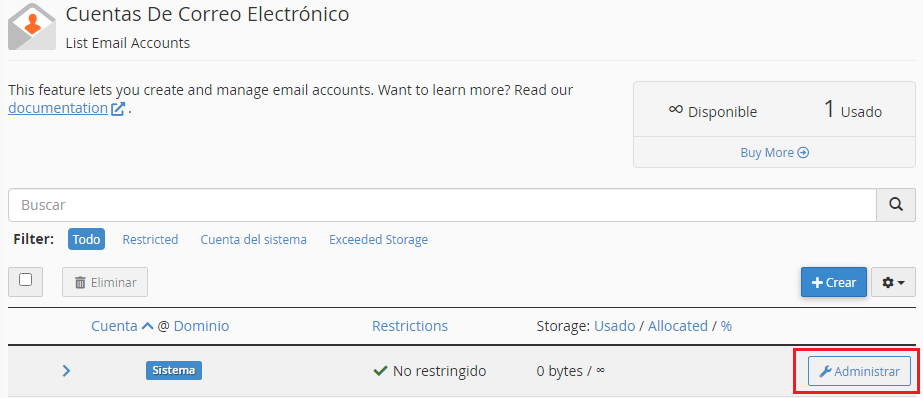
- Next to the account you want to change, click Manage.
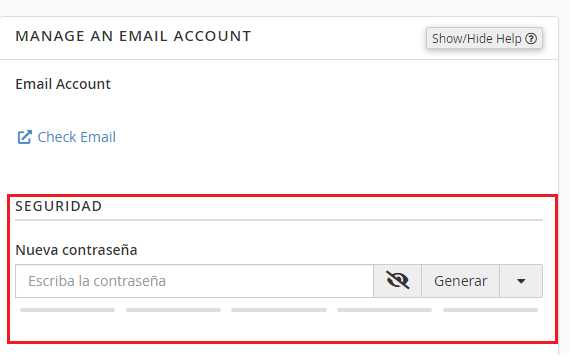
- Under Security, type the new password or click Generate.
- If the form asks you to repeat it, type it again.
- Click Update Email Settings.
From that moment on, the old password stops working. Update it in every place where you read that email: Webmail, Outlook, your phone, or another program.
Common issues
- I changed the password in the portal and the email account is still the same: that change was for the service. Repeat the steps in Email Accounts → Manage.
- Webmail won't log in: use the new password and the full email address, for example
info@yourdomain.com. - The email program keeps asking for the password: the old one is still saved. Replace it in that program's account settings.
- cPanel does not accept the password: generate another one. Do not use the account name, accents, or
ñ. - I don't see Update Email Settings: you are on a different screen. Go to Manage for that account and scroll down to Security.
If the account does not appear, the button does not save the password, or after the change you cannot log in even via Webmail, open a support ticket from the client portal or inquire via the site's online chat.