

This article explains how to log in to cPanel for your hosting, using your domain's direct link or from the client area.
What is it for?
cPanel is the panel where you manage your hosting: files, emails, databases, domains, and the rest of your plan's features. You can access it in two ways:
- Using the direct link for your domain, if you already have your cPanel username and password.
- From the client area, which opens the service's panel without prompting for that password.
Direct access: open https://yourdomain.com/cpanel and replace yourdomain.com with your domain. From the portal: client area → Services → Active service → Log in to cPanel.
Direct login
- Open your browser.
- Type
https://yourdomain.com/cpanel. - Replace
yourdomain.comwith the domain of the hosting you want to access. - Enter your cPanel username and password.
Important: your cPanel username is not your client area email. If you don't remember it, log in through the portal instead: the Log in to cPanel button opens your hosting session.
Logging in from the client area
- Log in to the client area with your account's email and password.
- Go to Services.
- Select the hosting account you need to access. In the list it will show as Active; click on that row.
In the service details, you will see a summary of your hosting features. To open the full panel:
- In the left sidebar, or under the Actions section, click Log in to cPanel.
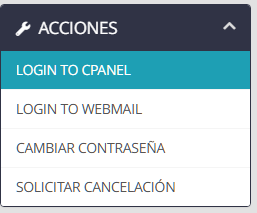
cPanel for that hosting account will open.
Frequently Asked Questions / Troubleshooting
- yourdomain.com/cpanel does not open: check that the domain belongs to the hosting account and that the service is Active. Try logging in from the client area.
- The direct link asks for a password I don't have: that password is your cPanel password, not your client area password. Log in via Services → Log in to cPanel.
- I can't see the Log in to cPanel button: confirm that you opened the service details (the row showing Active) and check the left sidebar and the Actions section.
- The service is not Active: a suspended or pending hosting service will not open cPanel. Check the status under Services.
If you cannot log in, the domain does not resolve /cpanel, or the button does not appear, open a ticket from the client area or contact us via the website's live chat.