
This article explains how to view a payment order, whether paid or pending. The list is not inside cPanel: that menu opens the client portal.
What is it for?
It is used to check the number, due date, amount, and status, and to pay an order that remains unpaid.
- Unpaid: it is pending. You can pay from the details.
- Paid: it has already been paid.
- Cancelled and Refunded: the order is no longer valid or the payment was reversed.
Access: log in to cPanel from the client portal → Log in to cPanel, or at https://yourdomain.com/cpanel. If the access asks for your portal password, it is the one for that account, not the cPanel one.
Open the list
- In cPanel, open Billing & Support → View invoice History.
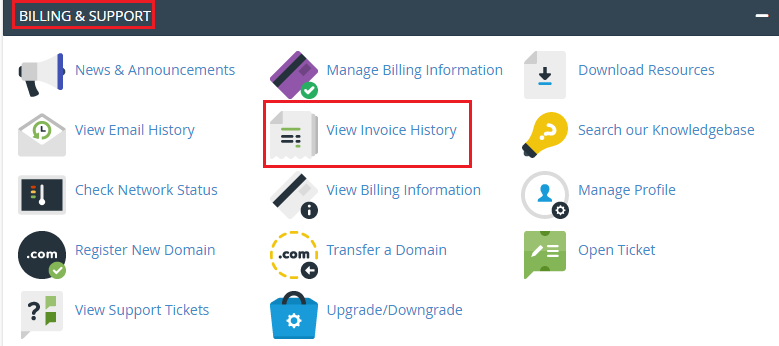
- The browser opens My Invoices in the portal.
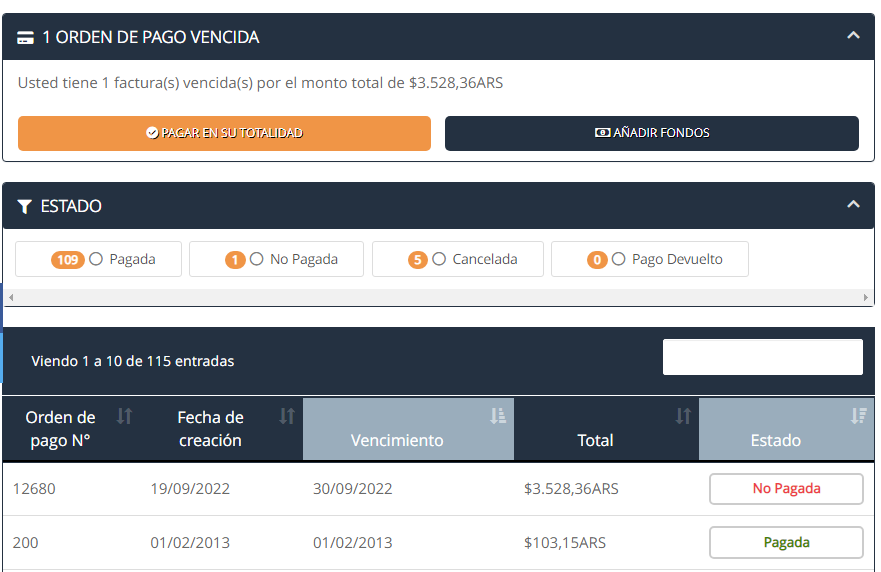
At the top, Overdue Payment Order shows pending ones and the access to pay them. Under Status, you can filter by Paid, Unpaid, Cancelled, or Refunded.
The table can be sorted by Creation Date, order number, Due Date, Total, and Status.
View an order
- Click on Unpaid or Paid, or on the order number.
- For an unpaid one, Pay Now opens the payment. For a paid one, you can see how it was paid.
The details show the number (Payment Order No.), the Creation Date, the Due Date, the Client Details, the service and period, the amount with tax, the Credit if there is a positive balance, the Total, and, if already paid, the payment method and the amount paid. From there you can also download or print. If the order already has an electronic invoice, the receipt is in the same details.
Common issues
- View invoice History asks for another password: it is the client portal password. The cPanel password does not open My Invoices.
- There are no orders: the portal account has no uploaded payments, or the Status filter left the list empty.
- The pending one does not appear at the top: remove the status filter or look for it as Unpaid.
- I entered a paid one and I don't see Pay Now: that order is already settled. The payment is in the ones that say Unpaid.
If the menu does not redirect or a paid order does not open the details, open a ticket from the client portal or consult via the site's online chat.