

This article explains how to access email via Webmail and manage the mailbox with Roundcube.
What is it for?
Webmail opens the mailbox in the browser, without an installed program. From Roundcube you can read, reply to, delete, and organize the messages that are on the server.
- Log in with the email address and password of the mailbox.
- Open it from cPanel, without re-entering the password.
Access: open https://yourdomain.com/webmail or https://webmail.yourdomain.com. You can also log in from the client area → Access Webmail. Choose Roundcube.
Important: webmail.yourdomain.com opens if the domain is delegated to the hosting DNS. The mailbox must exist in cPanel → Email → Email Accounts. The password is the one for that mailbox, not the cPanel one.
Log in from the browser
- Open
https://yourdomain.com/webmailand replaceyourdomain.comwith your domain, with the extension (.com,.com.ar, etc.). - In Email Address, enter the complete mailbox, for example
info@yourdomain.com. - In Password, enter the one for that mailbox.
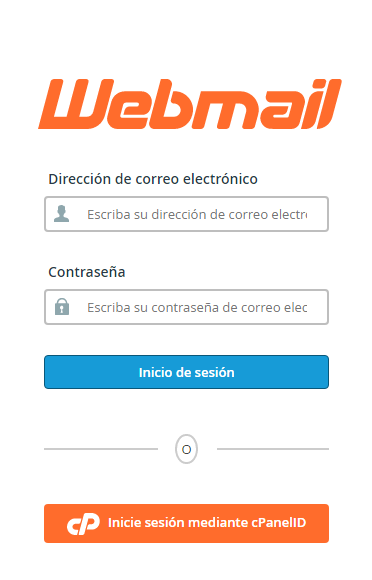
- If it asks you to choose a client, open Roundcube.

The inbox opens, with options to read and send email.
Log in from cPanel
- Log in to cPanel.
- Open Email → Email Accounts.
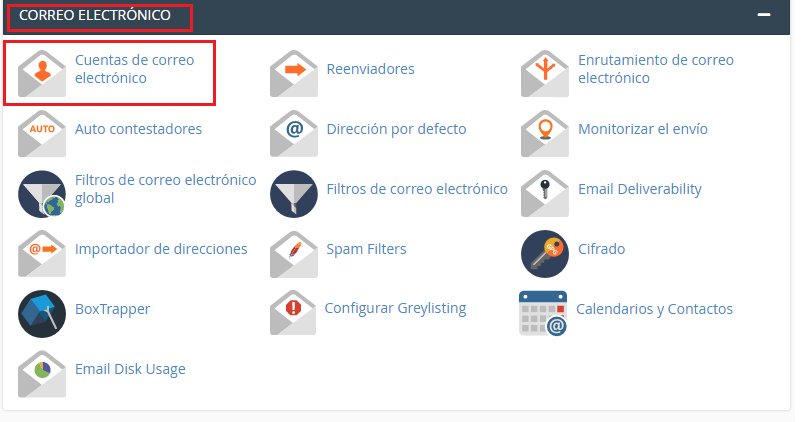
- For the mailbox you want to open, click on Manage.
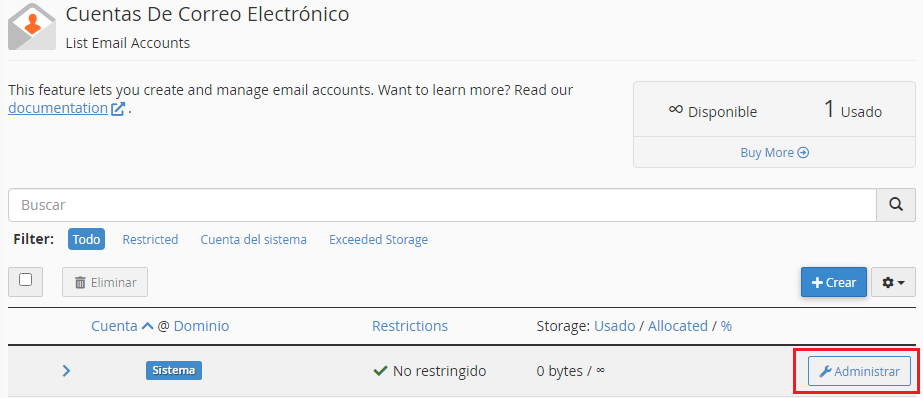
- Click on Check Email.

cPanel opens Webmail for that mailbox. If the client selector appears, choose Roundcube.
Common issues
- I am looking for Horde and it's not there: that client is no longer part of cPanel. Log in to Webmail and use Roundcube. Messages are not deleted due to that change.
- webmail.yourdomain.com does not open: try
https://yourdomain.com/webmailand check that the domain is delegated to the hosting DNS. - The password doesn't work: it must be the one for the mailbox, written completely with the domain. If it doesn't exist, create it in Email Accounts.
- Check Email opens another screen and asks for a client: choose Roundcube.
If Webmail does not open, the mailbox does not appear, or Roundcube does not show messages, open a ticket from the client area or check via the site's online chat.