
This article explains how to configure Microsoft Outlook to leave a copy of messages on the server after downloading them.
Why configure this option?
By default, Outlook deletes from the server the messages it downloads to your PC. This behavior is not suitable if:
- You want to share the mailbox with other people.
- You want to keep a copy on the server to access messages from Webmail.
Important: Messages that remain on the server take up space from your Web Hosting plan. If you end up using all the allocated space, none of your email boxes will be able to continue receiving messages.
Configure Outlook 2007–2010
- Open Outlook.
- Go to Tools → Account Settings...
- On the Email tab, select the account to modify and click Change...
- Click the More Settings... button.
- Go to the Advanced tab and check the box Leave a copy of messages on the server.
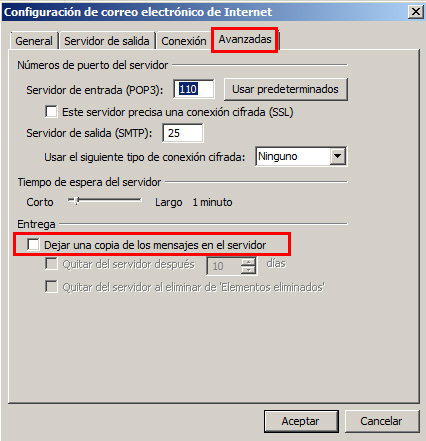
- Click OK, then Next and finally, Finish.
Outlook in newer versions
In Outlook 2013 and later, the path is similar:
- File → Account Settings → Account Settings...
- Select your account → Change... → More Settings... → Advanced tab
- Check Leave a copy of messages on the server.
Do you need additional help?
If you have questions about configuring your email in Outlook, you can:
- Consult Aura in the site's online chat.
- Open a ticket in Viafacil.